Resume & CV
How to Create an ATS-Friendly Resume in 4 Steps
Create a resume that recruiting software can process and a recruiter can trust. This guide is written primarily for US and Canadian applications, but the core ATS guidance remains useful across other markets.
Written By Ita John
Founder, CVJury
Published 6 April 2024Updated 13 October 202610 min readPrimarily for a US and Canadian resume audience

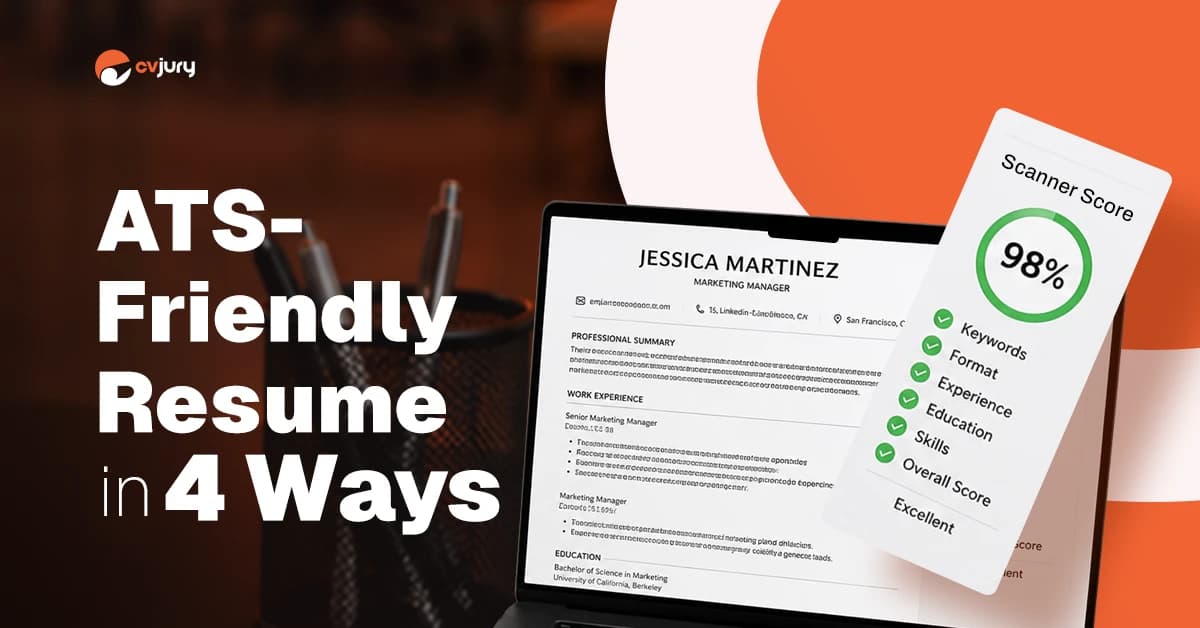
An ATS-friendly resume is easy for recruitment software to process and easy for a recruiter to understand. It uses a clear reading order, familiar headings, relevant job language, and selectable text.
The goal is not to outsmart an ATS. It is to prevent formatting problems, make relevant experience easy to find, and give a recruiter credible reasons to continue reading.
The Short Answer
To make your resume ATS-friendly: 1. Use one clear reading order with common resume headings. 2. Follow the application's upload instructions and submit selectable text. 3. Match the job description with truthful keywords and evidence. 4. Make the content useful to a recruiter, then test the final document. The CVJury ATS Test
Readable
Can software and a recruiter follow the document in the correct order?
Relevant
Does it use language that matches the role and its requirements?
Believable
Are those terms supported by evidence, scope, and outcomes?
What Is an ATS-Friendly Resume?
An applicant tracking system, or ATS, collects and manages applications. A parser may extract your name, role titles, company names, dates, education, and skills into fields in the hiring platform. Workday also explains that ATS parsing engines can extract education, skills, and work history into structured candidate profiles.
Some tools support searches, filters, or matching. That does not mean every ATS uses one score or makes the final hiring decision.
The phrase applicant tracking system (ATS) covers software used at different points in the recruitment process. ATS software may place extracted details in a database and help a hiring manager or human recruiter find applicants. Different systems use different features and employer settings, so one resume's ATS score cannot predict what every organization will do.
How an Applicant Tracking System Reads Resume Content
1
Collect
Receive the application and uploaded documents.
2
Parse
Extract details from the resume.
3
Store
Place information in candidate fields.
4
Search or filter
Help teams find applicants or apply rules.
5
Support review
Present information to the hiring team.
The exact workflow depends on the employer. Greenhouse says its Talent Matching feature compares resumes with recruiter-defined criteria but does not automatically advance or reject candidates. The hiring team makes those decisions.
Parsing Is Not the Same as Rejection
A parsing problem means software may miss information, place it in the wrong field, or require manual correction. It does not always mean rejection.
Greenhouse identifies columns, tables, page headers and footers, text boxes, graphics, images, and unclear sections as possible causes of parsing problems.
Some employers use application questions to reject applicants who do not meet a fixed requirement, such as work authorization, a license, or location. That is different from a resume parser disliking one keyword.
1. Use a Clean ATS-Friendly Resume Format
Use a format that follows a logical path from top to bottom and helps the recruiter find your current role, skills, and strongest results.
Choose One Clear Reading Order
Use one main column for your content. Multi-column designs can separate related details or cause text from two areas to be read in the wrong order. MIT and Greenhouse both warn that columns, tables, and text boxes can interfere with parsing.
For most experienced professionals, a reverse-chronological work history is the easiest starting point. Put your latest role first and keep each role title, company, location, and date range together. Read CVJury's resume format guide before choosing a chronological or hybrid structure.
Use Common Headings and Standard Section Titles
Use labels such as Professional Summary, Skills, Work Experience, Education, Certifications, and Projects.
"My Journey" or "Superpowers" makes the section harder to identify. You do not need one exact label. You do need familiar language.
Keep the resume in a simple format and use a familiar font such as Arial, Calibri, Cambria, Georgia, or Times New Roman. Keep the skills section easy to scan, with specific skills in a short list rather than buried in a paragraph.
Keep Contact Details in the Main Document Body
Place your name, phone number, professional email, city and state or province, and LinkedIn address at the top of the main document body.
Do not place essential contact details inside Microsoft Word's page header, page footer, or a floating text box. Greenhouse says those locations can cause parsing problems.
Try this now: Select all text in your resume. If your name or contact details are not selected with the main body, move them into the body before you apply.
2. Use a File Type the Employer Accepts
The job posting or application portal comes first. Send the file type the employer requests.
Choose a Word Doc or Text-Based PDF Resume File
When no file type is stated, DOCX and a clean, text-based PDF are both common choices. Greenhouse accepts both, and MIT says DOC, DOCX, or PDF is usually suitable unless the posting says otherwise.
A Word doc usually means a .doc or .docx document. Save and reopen the resume before uploading it so you can confirm that the layout, links, and text still appear correctly.
| File Type | Use It When | Check Before Sending |
|---|---|---|
| DOCX | The employer asks for Word or gives no file rule. | Formatting stays stable after saving and reopening. |
| Text-based PDF | The employer accepts PDF and you want the layout to stay fixed. | You can highlight, copy, and paste the text in the correct order. |
| Scanned or image-only PDF | Do not use it for a standard online application. | There is no dependable text layer for the parser to extract. |
Never Submit a Scanned Resume
A scan may look like a document to you, but it can behave like one large picture. Greenhouse lists image uploads as a cause of failed parsing.
Open the document and try to highlight one sentence. If the whole page behaves like a picture, export the resume again from Word, Google Docs, or your resume builder.
3. Match the Job Description With Honest Evidence
Use the language in the posting when it truthfully describes your work. Do not copy the posting. Make the match between the job requirements and your evidence easy to find.
Find Relevant Keywords in the Job Requirements
Mark the target job title, required hard skills, tools, certifications, methods, and industry terms. Put required qualifications before optional preferences.
Use those terms in your summary, skills, and work experience where they fit. MIT recommends meaningful keyword use and warns against wording that hides useful detail.
Keyword optimization does not mean adding every phrase from the job posting. Focus on specific keywords that describe real requirements. Add keywords only where your experience proves them.
Weak Duty
Experienced with several business systems.
Strong Resume Achievement
Led an enterprise resource planning (ERP) rollout across finance and procurement, completing deployment across four business units.
Why it works: The stronger line includes the job term, the common acronym, the business areas involved, and the scale of the work.
A Four-Pass Resume Adaptation Process
1
Mark the required title, skills, tools, and qualifications.
2
Match each important requirement to evidence from your experience.
3
Revise the summary, skills section, and strongest recent bullets.
4
Remove unsupported terms, then test the exported document.
Use Full Terms and Acronyms
Spell out an important term once, followed by the acronym, such as Customer Relationship Management (CRM), Project Management Professional (PMP), or Search Engine Optimization (SEO). A recruiter may search the full term, the acronym, or a related phrase.
Make Unusual Job Titles Recognizable
Your internal title may not match the title hiring teams recognize. When a standard equivalent truthfully describes the role, show both:
Customer Success Manager
Internal title: Customer Happiness Ninja
Do not rename a role to claim work you did not perform.
Do Not Stuff or Hide Keywords
White text, repeated keyword blocks, and copied job descriptions damage trust and are easy to reveal. Use each important term where it proves a real skill, action, requirement, or result.
4. Make the Resume Useful to a Recruiter and Test the Final File
A parser can extract every line correctly and the resume can still fail to persuade. The recruiter still needs evidence that you can do the work.
Show Outcomes, Not Just ATS Keywords
Weak Duty
Responsible for managing vendor relationships.
Strong Resume Achievement
Renegotiated agreements with 14 suppliers, reducing annual purchasing costs by $320,000 while maintaining delivery targets.
Why it works: The revised bullet shows the action, scale, financial result, and service condition.
Government of Canada Job Bank also advises candidates to highlight achievements instead of simply listing responsibilities. Use CVJury's guides to resume accomplishments and resume action verbs when rewriting your bullets.
Show Promotions, Contracts, and Consulting Work in Order
Keep progression visible when you held more than one position within the same company:
Northstar Logistics
Senior Operations Manager | 2023-Present
Operations Manager | 2020-2023
Label contract and consulting roles honestly. Explain a career gap briefly when needed, then return attention to relevant evidence.
Use the Space Your Experience Needs
An experienced professional may need two pages when both pages support the target position. Penn Career Services says professionals with more experience generally use one to two pages.
Shorten older or unrelated roles before cutting current leadership, specialist knowledge, or measurable results.
Run the Plain-Text Test
1
Copy the full resume.
2
Paste it into Notepad or another plain-text editor.
3
Check that headings, dates, company names, and bullets appear in the right order.
4
Confirm that your name and contact details remain visible.
5
Check the exported document for spelling, working links, and missing text.
MIT recommends a plain-text test to spot missing text or content that appears in the wrong order.
Use Scanner Results as Review Prompts
A resume scanner can flag missing terms, weak evidence, possible formatting issues, or skill gaps. It cannot copy every hiring platform or recruitment rule.
A cleaner ATS-friendly resume may remove avoidable barriers in the hiring process, but it cannot promise a job interview. Treat a score as a prompt to review the resume, not as a universal passing grade. Read CVJury's guide to using an ATS resume scanner before relying on one.
Annotated ATS-Friendly Resume Example
This example uses a redacted resume and a real CVJury scanner result to show what the checks look like in practice. The resume scored 94% in that scan, with full marks for ATS best practices, hard skills, and soft skills, plus one area to improve in the Sales Index Match.

The callouts show contact details in the main body, familiar headings, a clear reading order, relevant language, results, and dates kept with each role. The scanner score belongs to this specific CVJury scan. It is not a universal ATS pass mark.
About this example: Personal contact information, employer names, universities, and other identifying institutions were removed or replaced. The original resume and scanner report supplied for this article confirm the 94% result and the four category outcomes.
ATS-Friendly Resume Checklist
Dos
- Use one clear reading order.
- Keep text selectable.
- Use common section headings.
- Keep dates and role details together.
- Use job terms naturally.
- Show measurable or specific results.
- Use consistent date formatting and standard bullets.
- Use a sensible filename, such as FirstName-LastName-Resume.pdf.
Don'ts
- Put key details in page headers or text boxes.
- Submit a scanned image as the resume.
- Hide keywords in white text.
- Copy claims you cannot prove.
- Use creative headings that hide a section's purpose.
- Treat one scanner score as a hiring verdict.
- Send the document without reopening it and checking the links.
Before choosing an ATS resume template, check its reading order, section labels, and export quality. A template can provide a dependable structure, but the wording still needs to fit the position and show credible work.
The best resume builder is the one that lets you control the wording, use familiar section labels, and export clean selectable text. You can use CVJury's free resume builder to create a draft, then run the tests in this guide.
Common ATS Resume Myths
Reality
The Myth
Products and employer settings differ. Some parse and store information. Others also support searches, filters, matching, or application rules.
Every ATS uses the same score.
Some tools display match categories, but Greenhouse says its Talent Matching feature leaves advancement and rejection decisions to the hiring team.
A low scanner score means automatic rejection.
Many platforms accept PDF. The real risk is a scanned document or a layout that scrambles the text.
PDF resumes always fail.
Keywords without proof create noise. Use the terms that matter, then support them with skills and achievements.
More keywords always produce a better resume.
ATS-Friendly Resume FAQs
Should an ATS-friendly resume be one page?
Not by default. One page may suit early-career applicants. Experienced professionals may need two pages when both pages contain relevant evidence for the target role.
Can I use color on an ATS-friendly resume?
A restrained color choice for headings may be fine when the text remains easy to read and selectable. Do not depend on color, icons, or graphics to carry essential information.
Should I include a photo?
Leave it out for most US and Canadian private-sector applications. Government of Canada Job Bank says a photo is not the norm in Canada and can pull attention away from skills and experience.
Can I reuse the same clean resume layout?
Yes. Reuse a dependable layout, then adjust the summary, skills, and strongest recent bullets for the position. The design can stay. The evidence and relevant language should change.
Can I use tables, icons, or graphics?
Use caution. Tables, columns, text boxes, icons, and graphics can separate related information or interfere with parsing. Keep essential content in selectable text and one clear reading order.
Do I need an ATS-friendly cover letter?
Keep a requested cover letter simple, readable, and specific to the position. Use relevant language naturally, but do not repeat the resume line for line. Explain motivation, fit, and evidence that needs more space.
Key Takeaways
- Write for both recruiting software and the person who reviews the application.
- Use a simple resume format, common headings, recognizable section labels, and selectable text.
- Follow the application's upload instructions.
- Use job-description language only where it truthfully fits your experience.
- Support keywords with outcomes, scope, and specific work.
- Run a plain-text test before uploading the document.
- Use a resume scanner as a review aid, not as a guaranteed verdict.
Your resume does not need to impress a machine. It needs to reach the hiring process in usable form and give the recruiter a reason to keep reading.
BEST NEXT STEP
Check the Resume Against the Position You Want
Upload your resume and job description to review the areas that can affect how well the document matches the role — ATS best-practice checks, job-specific hard and soft skills, measurable-result review, and missing terms and content gaps.
Review every recommendation before changing your resume. A scanner score is guidance, not a hiring promise.
Sources Used in This Guide
Greenhouse, “Unsuccessful resume parse”
Greenhouse, “Talent Matching FAQ”
Greenhouse, “Auto-reject application rules”
MIT Career Advising, “Make your resume ATS-friendly”
Greenhouse, “Supported candidate upload formats”
Government of Canada Job Bank, “How to write a good resume”
Penn Career Services, “Write a Resume/CV”
Workday, “What is an applicant tracking system?”
About the author
Ita John
Founder, CVJuryDr Ita John is the founder of CVJury. He previously worked as an IT recruiter in the London market for nearly seven years at Star Jobs Recruitment and founded the NECareersConnect careers platform. He brings experience in recruitment, practical project management, and business development. Earlier in his career, he taught business and economics at Oxford Brookes University and in Nigeria for over a decade. He lives in England with his wife and three sons. He earned a PhD in Entrepreneurship, International Business, and Economics from Oxford Brookes University. See how his background shapes the work he does for you. Read his story.
Connect
 LinkedIn
 Happenstance